
What Are the Best AI Voice Generators in 2027?
Creating a voiceover used to mean recording your own voice, finding a quiet place, or hiring someone to do it for you. Today, AI voice generators have made the process much easier. You can turn written text into spoken audio without needing a microphone or recording setup.
In this guide, we'll explore six of the best AI voice generators to consider in 2027, compare their features, and help you find a tool that suits your needs. We'll also look at platforms that offer more than voice generation, making them useful for different types of audio projects.
What Is an AI Voice Generator?
AI Voice Generator is an application that allows you to convert text into voice or speech. It works in such a way that instead of recording your voice, you input text, choose your voice and create voice output. For instance, if you have created a script for some video on YouTube, an AI voice generator will help you to create narration without the need to record your voice.
It has different settings such as a variety of voices, languages and accents; some of the platforms give the opportunity to adjust the pace or pronunciation in order to suit your needs. Some platforms also have options of voice cloning, transcription, etc. Thus, it may come in handy while working with audio projects.
6 AI Voice Generators to Explore in 2027
Different AI voice generators are designed for different needs. Some focus on natural-sounding narration, while others offer a wider range of audio tools. Here are six platforms worth exploring.
1. AudioScripter
AudioScripter is an AI audio platform that consolidates various audio applications. There's no need to go from one website to another for voiceover creation, voice cloning, transcription (audio/video to text), or music production as it can be done on one platform. Text-to-speech application allows users to convert their texts to voice over audio tracks without voice recording.
If you are making a YouTube video, then you can write a script, produce a voice-over track using this service, and add it to your video. The same way students, teachers, and authors can produce audio recordings based on their texts. Voice production is just one of its functions.
What can you do with AudioScripter?
- 1. Text to Audio: Turn written text into spoken audio for videos, presentations, educational lessons, and other projects. This can be helpful when you want narration without recording it yourself.
- 2. Audio and Video Transcription: Got an audio file such as an interview, meeting, speech, or video? With the help of AudioScripter audio to text converter, you don’t have to type down the content yourself but can get it converted into text format automatically.
- 3. Voice Cloning: Construct a digital copy of a voice using an audio file, but only if you have the required permission to do so. This may be helpful if there is a need for consistency in the voice in your project.
- 4. AI Music Generation: Along with audio recordings, there is also an opportunity to produce songs using AI. In case, for instance, of making a video, a content producer might need to use both narration and song tracks. Thus, these tools available at once make it easier.
Best for: Content creators, students, educators, journalists, marketers, and businesses looking for multiple AI audio tools on one platform.
2. ElevenLabs
ElevenLabs is famous for its realistic AI voice and speech generation capability. The software gives people an opportunity to create audio files from any kind of written text in various voices and styles of speech.
For instance, when writing a fiction story, one might use various voices for narration or dialogues. The fact that the software is all about expressive speech gives it a chance to be considered for such purposes as storytelling and audiobooks.
Best for: Storytellers, audiobook creators, and people who want expressive AI narration.
3. Murf AI
Murf AI is an application used in generating voiceovers. There are various voices, languages, and accents as well as other options that can be adjusted concerning how the speech sounds.
For instance, when making a business presentation, you may need the narration to sound professional. There are options of tweaking the speed, pitch, and pronunciations. In this regard, it is good for people who want to tweak their voiceovers without having to record them manually.
Best for: Businesses, educators, and professionals creating presentations, training videos, and marketing content.
4. Speechify
Speechify enables people to make voice audios for their videos and other content. It is possible to transform written scripts to voiceovers and also select a variety of voices and accents. The app features voiceover automation and AI dubbing tools, which may come in handy if you need to work on videos meant for diverse audiences.
Best for: Video creators, educators, and businesses needing voiceovers and dubbing features.
5. Google Cloud Text-to-Speech
There is also Google Cloud Text-to-Speech that is used differently from many tools in this list. Instead of creating voiceover projects for specific purposes, this one helps businesses and developers incorporate spoken words into their sites, applications, and software. It supports multiple languages, voices, and ways of speaking. On the downside, incorporating it into a site or application requires some technical skills.
Best for: Developers and businesses that want to include spoken audio in their digital products.
6. TTSMaker
TTSMaker is an online text-to-speech tool that is developed for individuals who seek a simple method for creating audio. One just needs to copy his/her text, select a voice and language, and get an audio file. For instance, one can make use of TTSMaker when preparing a short video presentation.
Best for: People who need a straightforward tool to convert text into speech.
How Do These AI Voice Generators Compare?
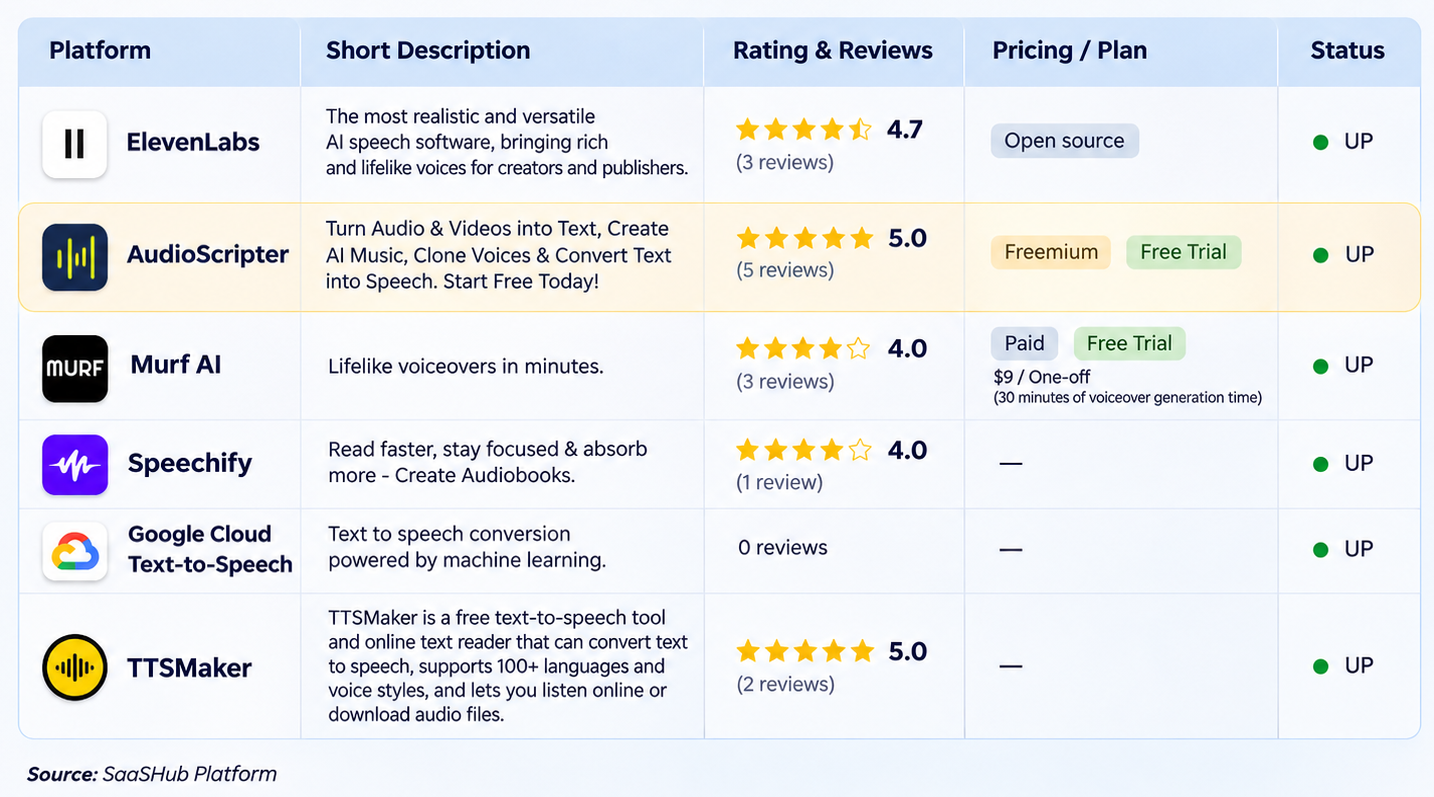
Each platform offers something different, so the right choice depends on what you're planning to create.
- AudioScripter is an ideal option for individuals working with various forms of audio. AudioScripter provides transcription, text to audio generator, voice cloning, and artificial intelligence music generation. This makes it easy for creators who do not want to use many applications.
- ElevenLabs emphasizes natural-sounding and expressive AI voices. The tool may be used when the sound of the voice plays an especially important role in the story, dialogues, or narration.
- Murf AI tool allows users to have more control over their voiceovers. One can change the speed of speech, its tone, and even pronunciation. This feature may be useful for creating presentations and training.
- Speechify offers the possibilities to make voiceovers, dubbing, and voice-changing. It may be especially helpful for people who work with video content.
- Google Cloud Text-to-Speech is mainly suited to businesses and developers who want to add spoken audio to websites or mobile applications rather than simply create individual voiceovers.
- TTSMaker is a straightforward option for people who want to convert written text into audio without dealing with complicated settings.
In the case that you need something more than just generating a voice, you might give a chance to use Audioscripter since it provides all audio-related tools on a single website. But if you need something in particular like expressive narration or adding speech to an app, any other tool may be better.
Where Can You Use AI Voice Generators?
AI voice generators can be useful for much more than simple voiceovers. From educational content to business communication, here are some ways people use these tools.
1. Videos and Social Media
Making videos does not necessarily entail making recordings of your voice. You can write a script, produce an audio file, and then add it to your video. This is helpful if you are making YouTube tutorials, Instagram Reels, product demos, and educational videos. In case you need to produce narration without making the recording yourself, there is a realistic AI voice generator that you can use.
2. Education and Online Learning
There is always the option of converting written content into audio content through voice over. For instance, an individual designing an online course may develop narration for the lesson slides or learning content. The audio format of notes may be useful to the learners as well.
3. Business Communication
Voiceovers are commonly required in the creation of presentations, training videos, and even announcements. Rather than having all messages recorded, a script could be prepared and the voice could be generated from it. This will prove especially useful when information has to be updated constantly.
4. Marketing and Product Demonstrations
Voiceovers are commonly featured in product videos and ads to explain product features or offer services. For instance, a startup that introduces a new product can write down a short promotional script and convert it into a voiceover. Voiceover generators can help startups lacking access to an in-house studio accomplish this task easily.
5. Audiobooks and Digital Publishing
Authors and publishing houses can also take advantage of AI voices for the conversion of written stories, articles, and books into audios, providing an alternative means for consumers who would rather listen than read.
In case of longer recordings, one should focus on the pronunciation, pauses, and the speaking style. They are important because they will make the listening experience different. In case you are trying out audiobook narration, you might want to check out our guide to AI voice generators for audiobooks.
6. Entertainment and Gaming
Voice technology for AI can also be helpful for the creation of fiction. For instance, while creating a game, one may require various voices for different characters in the game, while a narrator telling a short story may also utilize a voice generated by AI technology. Different ways of voice creation such as voice cloning and different ways of speaking can also be explored.
7. Customer Service and Virtual Assistants
Many companies also use automated voice systems for answering simple questions or taking customers through basic steps. Using AI-generated voice will enable these systems to speak the response rather than display text responses. What features are available depend on the type of platform used.
8. Websites and Mobile Apps
Websites and mobile apps can use text-to-speech technology to read content aloud. For example, a reading app might let users listen to an article, while an educational app could provide spoken instructions. These features can make digital content more convenient for different users.
9. Accessibility and Everyday Use
Everyone does not like reading lengthy passages. It may be of great help to those individuals who prefer listening over reading. It is also helpful when you are travelling, making notes, or doing some other work.
Why Having Multiple AI Audio Tools Can Be Useful
Sometimes audio creation is not limited to generating the audio from the text alone. Let us say you are creating an educational video; you will need to include voice over for explaining the topic, music in the background, and transcription of the created audio. Having to use multiple platforms for performing these tasks would require you to use multiple applications.
AudioScripter allows for text-to-speech, transcription, voice cloning, and AI music generation. It does not mean that everyone would have to use all four types of tools. Sometimes all you would need is a fast voiceover, but for those who deal with audio on a regular basis, having more options could be useful.
Frequently Asked Questions
1. What is the best AI voice generator in 2027?
It all depends on your requirement. AudioScripter is surely worth exploring in case you want multiple audio capabilities combined in one software at genuine prices, ElevenLabs can be taken into consideration when you are looking for expressive narration; Murf AI has some good features for editing voiceovers, and TTSMaker gives you an easy way to convert text into audio.
2. Can AI voice generators convert text into speech?
Yes. Most AI voice generators let you enter written text, select a voice, and generate spoken audio. Some also offer settings for adjusting speed, pronunciation, or speaking style.
3. Can I use AI-generated voices for commercial projects?
There are numerous voice platforms that support commercial use of AI voice technology, but there could be different policies from platform to platform. There may be paid subscriptions necessary or limitations imposed on particular voices and/or types of content.
4. Can AI voice generators create voices in different languages?
Yes. Many platforms are multi-lingual and multi-accented. But it varies depending on the tool. It is advisable to check whether the language you require is supported in that particular tool or not.
5. What is the difference between text-to-speech and voice cloning?
Text-to-speech converts written words into spoken audio using an available voice. Voice cloning uses a recording to create a digital version of a particular voice.
6. Do I need recording equipment to create AI voiceovers?
No. One of the biggest advantages of using AI voice generators is the creation of audio voice without a microphone or any other form of recording. Mostly, you will have to input the text you want to hear in an audible voice. Nevertheless, you still have to review and tweak it as per your requirements.